
Auto Screen Shooter vs Lightshot, Greenshot & Awesome Screenshot
Lightshot and Greenshot excel at quick region grabs. Awesome Screenshot adds in-browser full-page capture. Auto Screen Shooter goes further — full-page capture on desktop and in Chrome, MP4 scroll video, and automated interval screenshots.
Side-by-side comparison
Auto Screen Shooter vs Lightshot vs Greenshot vs Awesome Screenshot
Honest, feature-by-feature breakdown based on publicly marketed capabilities (June 2026).
| Feature | Lightshot | Greenshot | Awesome Screenshot | Auto Screen Shooter (A·S·S) |
|---|---|---|---|---|
| Platforms | Windows, macOS | Windows | Chrome Extension, Firefox | macOS, Windows, Chrome Extension |
| Full Page Capture | ✕ Not available | ✕ Not available | Yes — browser only | Yes — desktop + browser |
| Video Capture (MP4) | ✕ Not available | ✕ Not available | ✕ Not available | Full website page to MP4 |
| Interval Capture (Paid) | ✕ Not available | ✕ Not available | ✕ Not available | Automated timed screenshots |
| Ease of Use | Requires app | Requires app | Requires browser extension | Desktop apps don’t require opening a site |
| Price | Free | Free | Free (premium available) | Free + paid upgrade for intervals |
Lightshot, Greenshot, and Awesome Screenshot are trademarks of their respective owners. This is an independent comparison by Amiplay Co., Ltd., published June 2026.
Exclusive advantages
3 Reasons to Choose Auto Screen Shooter
These are the capabilities Lightshot, Greenshot, and Awesome Screenshot simply do not offer — no matter which plan you choose.
Full-Page Capture Everywhere
Stitch entire scrolling webpages on desktop and in Chrome — not just a region or window. Lightshot and Greenshot stop at partial captures; Awesome Screenshot is browser-only.
Desktop + ChromeMP4 Scroll Video
Record a silky-smooth full-page scroll as MP4 from the desktop app — perfect for demos, stakeholder reviews, legal archives, or social walkthroughs.
Only on desktop appsScheduled Auto-Capture
Set capture intervals — every hour, every night, every week. Monitor competitor pages, archive listings, or build time-lapse documentation automatically.
Licensed featureSee it in action
Desktop App & Chrome Extension
A full visual toolkit — from a powerful desktop control room to a one-click Chrome extension.
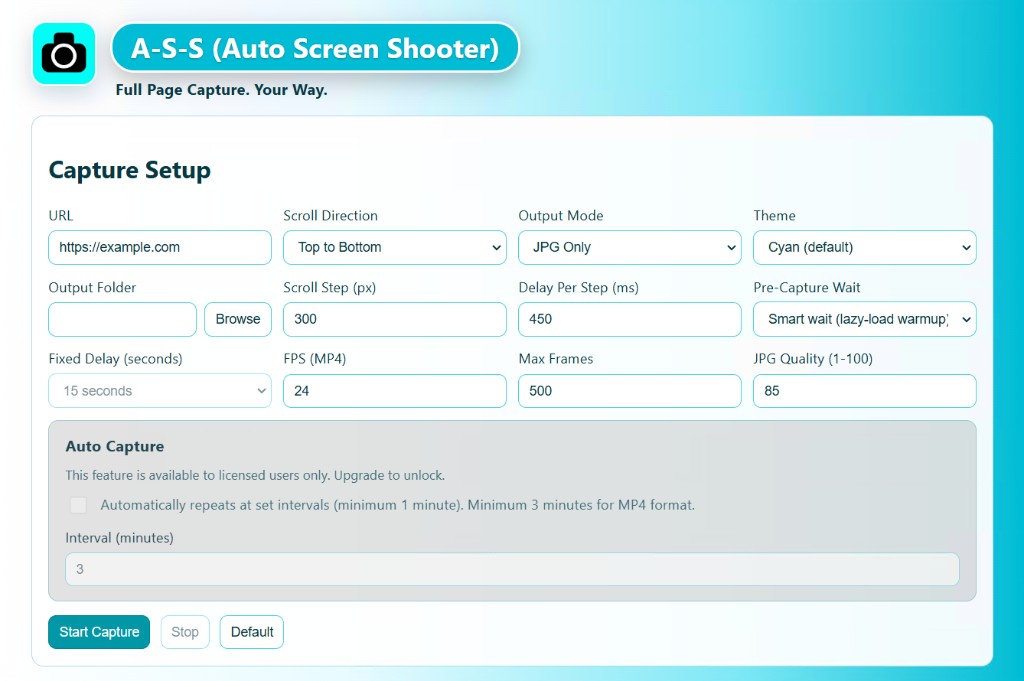
Desktop App — Full-Page Control Room
Enter any URL, choose JPG / PDF / MP4, adjust quality, and capture — no browser tab needed.
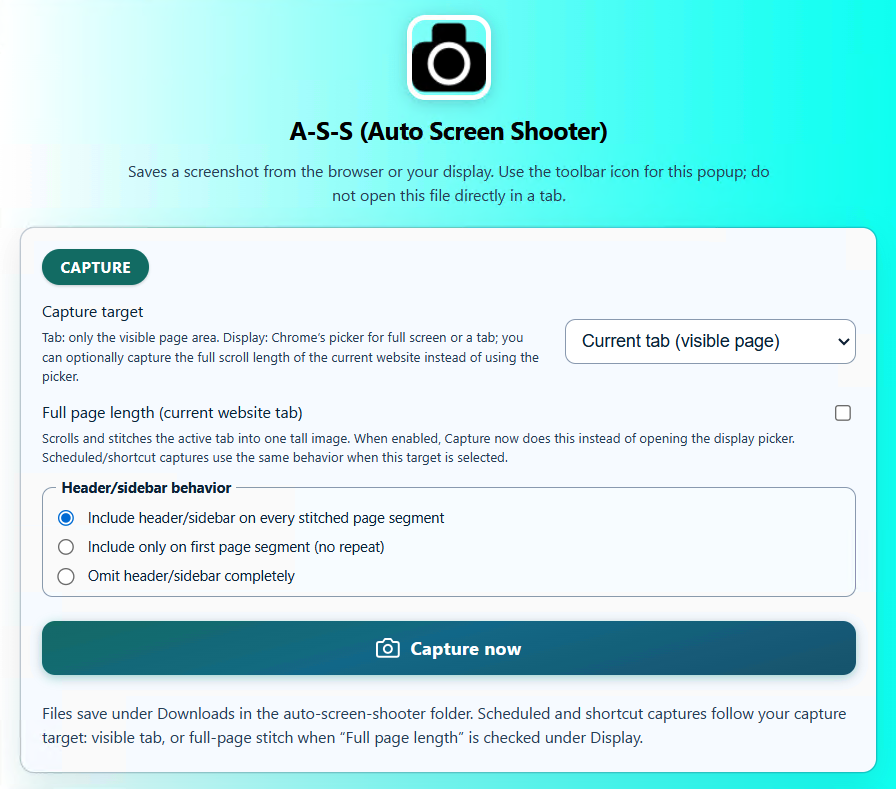
Chrome Extension — One-Click From Any Tab
Full-page capture in the browser when you need it — plus desktop-connected workflows when you need more.

Pixel-Perfect Stitched JPG
Entire long pages stitched into one seamless image — no seams, no missing lazy-loaded content.
Real workflows
Who Needs More Than a Region Grab
Lightshot and Greenshot are great for quick partial captures. These workflows need full-page power.
-
Web designers archiving full client pages
Capture an entire landing page as one JPG or PDF — not just the visible viewport. Lightshot and Greenshot cannot stitch a full scroll.
-
Marketers creating scroll demo videos
Record a full-page MP4 walkthrough from the desktop app — no separate screen recorder or browser extension juggling.
-
E-commerce sellers monitoring competitor listings
Schedule daily auto-captures of product pages. A·S·S runs at your chosen interval and saves each snapshot automatically.
-
Legal & compliance teams building evidence archives
Full-page PDFs and MP4 scroll recordings preserve complete page context — stronger than cropped region shots alone.
Honest take
When Lightshot, Greenshot, or Awesome Screenshot Fit
These are excellent tools for their niche. Here is when you should stick with them.
- You only need a quick partial-screen grab with instant sharing — Lightshot is built for exactly that.
- You work on Windows and want a lightweight, open-source region capture tool — Greenshot is a solid free choice.
- You need full-page capture inside Chrome or Firefox and never need desktop apps, MP4, or automation — Awesome Screenshot covers that.
- You have no need to capture entire webpages, record scroll videos, or schedule automated screenshots.
Frequently asked questions
Lightshot, Greenshot & Awesome Screenshot FAQ
Can Lightshot or Greenshot capture a full webpage?
No. Lightshot and Greenshot capture regions or windows — they do not stitch an entire scrolling webpage into one image. Auto Screen Shooter handles full pages on desktop and in Chrome; Awesome Screenshot can stitch full pages in the browser only.
Which screenshot tool records a full page as MP4 video?
Auto Screen Shooter — via the Windows and macOS desktop apps. Lightshot, Greenshot, and Awesome Screenshot do not offer MP4 full-page scroll recording.
Is Auto Screen Shooter free compared to Lightshot and Greenshot?
Yes. Auto Screen Shooter, Lightshot, and Greenshot all offer free tiers. Auto Screen Shooter adds an optional paid upgrade for interval-based auto-capture starting at $29.99 one-time — no subscription required.
How does Auto Screen Shooter compare to Awesome Screenshot?
Awesome Screenshot captures full pages inside Chrome or Firefox. Auto Screen Shooter matches that in-browser workflow and adds native Windows and macOS desktop apps, MP4 scroll recording, URL-based capture without a browser tab, and scheduled interval auto-capture.
How does this compare to GoFullPage?
GoFullPage is another browser-focused full-page tool. See our dedicated GoFullPage comparison for a feature-by-feature breakdown including desktop apps and one-time licensing.
Try Full-Page Capture Free
Desktop + Chrome · MP4 on Windows & Mac · One-time license from $29.99
Free tier available · 30-day refund guarantee · Windows 10+, macOS, Chrome