
The GoFullPage Alternative That Does More
GoFullPage captures your current Chrome tab. Auto Screen Shooter captures any URL on Windows & Mac — as JPG, PDF, or MP4 scroll video. Same one-click simplicity, infinitely more power.
Side-by-side comparison
Auto Screen Shooter vs GoFullPage vs Full Page Capture
Honest, feature-by-feature breakdown based on publicly marketed capabilities (June 2026).
| Capability | GoFullPage | Full Page Capture | Auto Screen Shooter (A·S·S) |
|---|---|---|---|
| Desktop app — Windows & macOS | ✕ Extension only | ✕ Extension only | Yes — Windows 10+ & macOS |
| Chrome extension one-click capture | Yes — market leader | Yes | Yes — PNG & PDF |
| MP4 scroll video recording | ✕ Not available | ✕ Not available | Yes — desktop exclusive |
| Capture any URL (not just open tab) | ✕ Current tab only | ✕ Current tab only | Yes — paste any URL on desktop |
| Export formats | PNG, JPG, PDF | PNG, JPEG, PDF | Desktop: JPG, PDF, MP4 Chrome: PNG, PDF |
| Scheduled auto-capture | ⚡ Limited (Premium) | ✕ Not advertised | Yes — licensed builds |
| Lazy-load tolerant stitching | ⚡ Varies | ⚡ Basic | Smart wait — catches lazy images |
| Team / agency seat packs | Per browser install | N/A | 5 / 10 / 100 / 500 seat packs |
| Pricing model | Free + ⚡ recurring Premium | Free forever (extension) | Free tier + one-time from $29.99 |
| Subscription required for pro features | Yes — monthly/annual | N/A | No — pay once, free upgrades |
GoFullPage and Full Page Capture are trademarks of their respective owners. This is an independent comparison by Amiplay Co., Ltd., published June 2026.
Exclusive advantages
6 Reasons Power Users Switch
These are the features that GoFullPage and Full Page Capture simply do not offer — no matter which plan you choose.
Native Desktop Apps
Full Windows 10+ and macOS apps that capture any URL you type — no browser tab required. Run batch captures unattended overnight.
Desktop exclusiveMP4 Scroll Video
Record a silky-smooth full-page scroll as MP4 — perfect for demos, court evidence, stakeholder sign-off, or TikTok-style walkthroughs.
Only on desktop appsScheduled Auto-Capture
Set capture intervals — every hour, every night, every week. Archive Shopify listings, monitor competitor pages, or build time-lapse docs automatically.
Licensed featureTeam Seat Packs
License 5, 10, 100, or 500 seats at a time — ideal for agencies, dev teams, and e-commerce operations that need consistent screenshots across multiple machines.
Volume licensingOne-Time Price, No Subscription
Pay $29.99 once for two seats. No monthly trap. Free upgrades as long as you hold the license. Cancel nothing — there is nothing to cancel.
No recurring feesLazy-Load Smart Stitching
Long Shopify product pages, infinite scroll feeds, and sticky headers — A·S·S waits for content to load before stitching so nothing is missing from your final image or PDF.
Smart rendering engineSee it in action
Desktop App & Chrome Extension
A full visual toolkit — from a powerful desktop control room to a one-click Chrome extension.
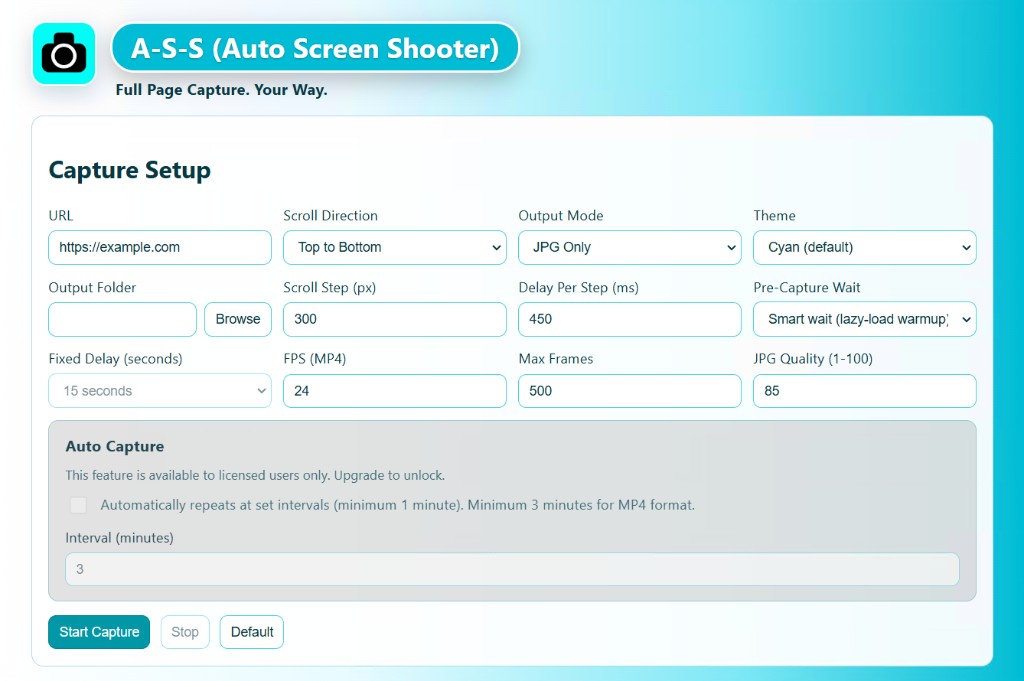
Desktop App — Full-Page Control Room
Enter any URL, choose JPG / PDF / MP4, adjust quality, and capture — no browser tab needed.
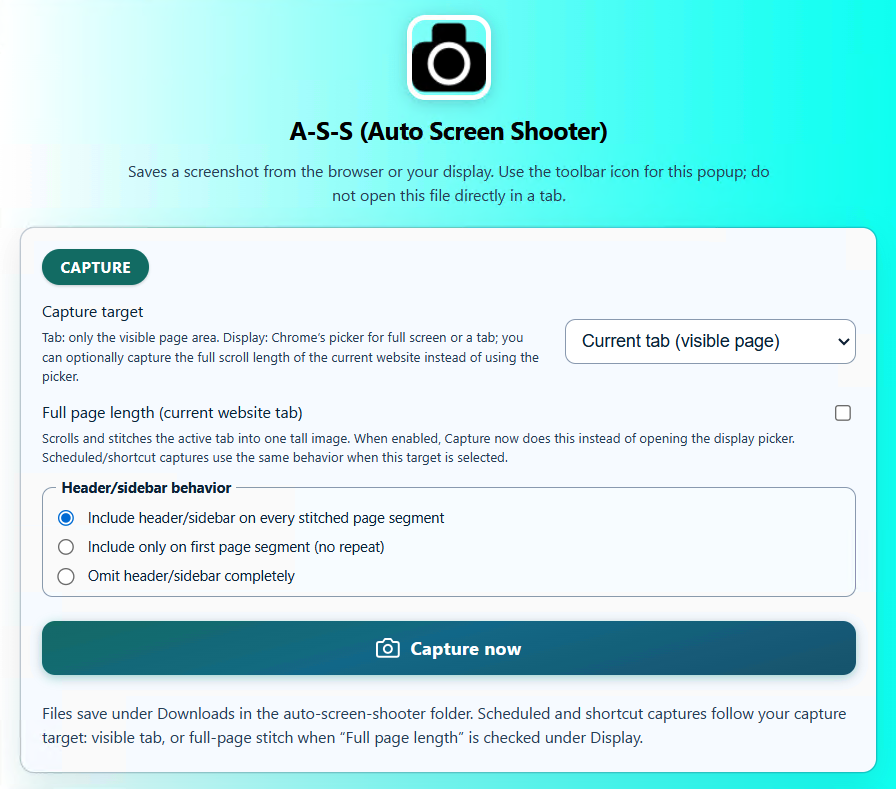
Chrome Extension — One-Click From Any Tab
Matches the GoFullPage experience you know — plus desktop-connected workflows when you need more.

Pixel-Perfect Stitched JPG
Entire long pages stitched into one seamless image — no seams, no missing lazy-loaded content.
Real workflows
Who Switches — and Why
These are the real workflows where GoFullPage hits a wall and A·S·S takes over.
-
Agencies running batch URL captures
Paste a list of client URLs into the desktop app and walk away. GoFullPage requires you to navigate to each tab manually.
-
Legal & compliance teams archiving evidence
MP4 scroll recordings carry timestamped motion proof — widely accepted as stronger evidence than static PNGs when page content is disputed.
-
E-commerce sellers monitoring competitor prices
Schedule daily auto-captures of competitor product pages. A·S·S runs at your chosen interval and saves each snapshot to your folder automatically.
-
Marketers & content creators making scroll videos
Record a beautiful MP4 walkthrough of any landing page for social, pitch decks, or stakeholder reviews — without juggling a separate screen recorder.
-
Dev teams doing QA across builds
Capture the same staging URL before and after a deploy. The desktop app handles it headlessly while you focus on code — no browser tab juggling.
Honest take
When GoFullPage Is the Right Choice
We respect GoFullPage — it pioneered this space. Here is when you should stick with it (or Full Page Capture).
- You only ever need a quick PNG or PDF from the browser tab already open in Chrome.
- You have no need for desktop apps, MP4 recording, or automated captures.
- You are comfortable with GoFullPage Premium's recurring subscription pricing.
- You work exclusively in the browser and never need to capture URLs outside the current tab.
Frequently asked questions
GoFullPage & Full Page Capture FAQ
What is the best GoFullPage alternative with a desktop app?
Auto Screen Shooter (A·S·S) is the top GoFullPage alternative with a native desktop app. It runs on Windows 10+ and macOS with no browser required. Exports include JPG, PDF, and — uniquely — MP4 scroll videos. The companion Chrome extension handles in-browser PNG and PDF captures, matching GoFullPage's core workflow.
Is Auto Screen Shooter free to use for full page capture?
Yes. Both the desktop apps and Chrome extension are free to download with no credit card required. The free tier includes watermarked captures. A one-time license from $29.99 removes watermarks and unlocks interval-based auto-capture. Unlike GoFullPage Premium, there is no recurring subscription.
Can Auto Screen Shooter record a full page as MP4 video?
Yes — this is Auto Screen Shooter's signature feature and something GoFullPage and Full Page Capture cannot do. The Windows and macOS desktop apps record a smooth full-page scroll as an MP4 file, useful for product demos, client presentations, legal evidence, and social media content.
What does "go full page" mean, and is there a better tool?
"Go full page" typically refers to the GoFullPage Chrome extension (gofullpage.com), which captures a full scrolling screenshot of any webpage in Chrome. Auto Screen Shooter is the leading alternative for users who need more: native desktop apps for Windows and Mac, MP4 video output, any-URL capture, scheduled automation, and one-time pricing with no subscription.
Does Auto Screen Shooter require a subscription?
No. Licenses are one-time purchases starting at $29.99 for a two-seat pack. Volume packs (5, 10, 100, 500 seats) are also available. All purchases include free upgrades for life. There is nothing to cancel, renew, or worry about each billing cycle — a key reason professionals choose A·S·S over GoFullPage Premium.
How does Auto Screen Shooter compare to fullpagecapture.com?
Full Page Capture (fullpagecapture.com) is a free Chrome extension for quick PNG/JPEG/PDF exports. It is a solid extension-only tool. Auto Screen Shooter adds native Windows and macOS desktop apps, MP4 scroll recording, scheduled auto-capture, and multi-seat licensing — capabilities that Full Page Capture does not offer. See the full page screenshot guide for step-by-step workflow comparisons.
Try the GoFullPage Alternative Free
Desktop + Chrome · MP4 on Windows & Mac · One-time license from $29.99
Free tier available · 30-day refund guarantee · Windows 10+, macOS, Chrome