
Chrome Extension · PNG & PDF
Full-Page Screenshots, From Your Toolbar
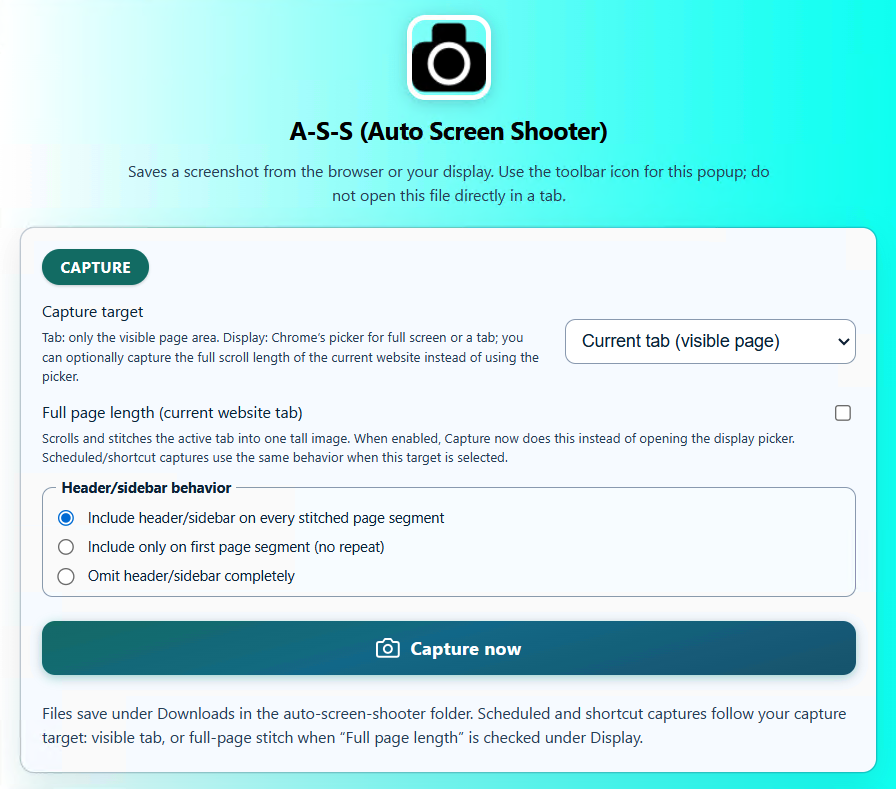
One click, or one keystroke, and the tab you are on becomes a complete PNG or PDF — the entire scrolling page, not just the visible part. It runs inside your browser, so it captures dashboards, inboxes and anything else behind a login exactly as you see it.
In one sentence
The Tab You Are On, All Of It
Click the toolbar icon, or press Ctrl+Shift+Y, and the page you are looking at right now
becomes a PNG or a PDF — the whole thing, stitched, not just the part you can see.
Because it runs in your browser, it captures pages behind a login exactly as you see them.
Use the extension when…
You are already in the page. Dashboards, inboxes, admin panels, anything that needs you to be signed in.
Viewport or full page
Capture just what is visible, or the entire scrolling document. Your choice, per capture.
Want MP4 or a URL you just paste?
That is the Full Page Capture desktop app — it needs no browser tab and can record a scroll as video.
What it does
A Small Tool That Takes Itself Seriously
Most capture extensions stop at “click, download”. This one has the parts you need once you are capturing every day.
Whole Page, Or Just The View
Operates on the active tab: the visible viewport, the stitched full page, or a desktop picker workflow. Automations fall back to the visible tab when the page will not allow a full scroll.
- Raster exports are PNG; documents export as PDF
- Manual capture from the popup, plus a configurable keyboard shortcut (
Ctrl+Shift+Yby default) - Optional auto-capture on a minute-based cadence, one minute minimum
Files land where you expect
Straight into Downloads/auto-screen-shooter/, or behind a “Save As” prompt if you would rather choose each time.
Filenames That Sort Themselves
Build a filename template from tokens instead of renaming a hundred downloads by hand. Presets and quick-insert helpers are built into the popup.
- Tokens such as
{yyyy},{host}and{title} - Save your own presets and reuse them
- Consistent names mean captures group correctly in any folder
Site rules
Block lists and allow-only lists, so auto-capture never fires on your bank or your email. Every rule has its own toggle, so you can switch one off without deleting the definition.
See What You Already Captured
A capture history inside the popup, with configurable retention from 5 to 150 entries. Export it to JSON, or clear it whenever you like.
- Retention is yours to set — keep five, keep a hundred and fifty
- Export to JSON for a record you can keep outside the browser
- Popup sizing guardrails (~576×720 default, width 400–900 px, height 320–920 px) so the UI never collapses into an unusable strip
Nothing leaves your machine
Captures are generated in the browser and written to your own downloads folder. There is no server in the middle and no account to create.
Free vs licensed
The Only Difference Is The Watermark
Every feature of the extension is in the free install — full-page capture, auto-capture, filename templates, site rules and history all work without a key. Unlicensed PNG and PDF exports carry a branding watermark; a licence removes it.
| Chrome extension | Free | Licensed |
|---|---|---|
| Watermark on exports | Applied to PNG and PDF | Removed |
| Full-page stitched PNG | Yes | Yes |
| Full-page PDF | Yes | Yes |
| Visible-viewport capture | Yes | Yes |
| Number of captures | Unlimited | Unlimited |
Keyboard shortcut (Ctrl+Shift+Y) | Included | Included |
| Auto-capture on a cadence (1 min minimum) | Included | Included |
| Filename templates & presets | Included | Included |
| Site block / allow rules | Included | Included |
| Capture history & JSON export | Included | Included |
| Account or cloud upload required | Never | Never |
Note: MP4 output and scheduled capture of a URL you simply paste in are desktop-app features, not extension features. See the desktop app →
Who it is for
Best At Pages You Are Signed Into
Dashboards & analytics
Capture a full report page behind a login, including everything below the fold, without exporting anything.
Bug reports
One shortcut, one PNG of the whole page, dropped straight into the ticket.
Receipts & confirmations
Save an order page as a PDF the moment it appears, named by date and host automatically.
Research & clipping
Keep long articles and listings exactly as they looked, with history so you can see what you already grabbed.
Design references
Collect full-page PNGs of sites you like, with filenames that sort into a usable library.
Monitoring a page
Auto-capture on a cadence while you keep the tab open, with site rules keeping it away from anything private.
Pricing
One Licence. All Three Apps.
Buy once, use it forever. There is no subscription and no renewal, and every future update is included.
Two concurrent activations, mixed freely across RECORD, the desktop capture app and the Chrome extension.
Buy 2 seats via StripeSecure checkout · 30-day money-back guarantee · free updates for life
Team & agency seat packs
| 5 seats | $64.95 | Buy → |
| 10 seats | $99.99 | Buy → |
| 100 seats | $799.00 | Buy → |
| 500 seats | $3,495.00 | Buy → |
Not sure yet? Download the free build first — run it as long as you like and buy a key only when the workflow sticks.
The other apps
The Other Two Apps
The extension is the lightest of the three. When you need MP4, scheduling, or a video of your screen, one of these will fit better.
Auto Screen Shooter — RECORD
Screen recorder with a camera bubble, background blur and instant replay. Records anything on your screen as MP4.
Capture a pageAuto Screen Shooter — Full Page Capture
Desktop app for Windows and macOS. Give it a URL, get the entire page as JPG, PDF or an MP4 scroll.
Install It, Capture The Next Page You Open
Free from the Chrome Web Store. No account, no sign-up, and every feature works before you ever enter a key.
Questions
Straight Answers
How is the extension different from the desktop app?
The extension captures the tab you are currently on, which means it works on pages behind a login. It outputs PNG and PDF.
The desktop app takes a URL you paste in, needs no open tab, and adds MP4 scroll recording plus scheduled auto-capture of that URL. If you need video or unattended scheduling, use the desktop app.
How is it different from RECORD?
RECORD makes a video of your screen — apps, games, calls, your webcam. The extension makes a still image or PDF of a web page. Completely different output.
Does the free version watermark my captures?
Yes. Unlicensed PNG and PDF exports carry a branding watermark. That is the only thing a licence changes for the extension — every feature is already unlocked.
Is there a cap on how many captures I can make?
No. Captures are unlimited whether or not you have a licence.
Can it capture pages I have to log in to?
Yes — that is its main advantage over the desktop app. It works on the tab as you are seeing it, session and all.
What is the keyboard shortcut?
Ctrl+Shift+Y by default, and you can change it to whatever you prefer in Chrome's extension shortcut settings.
Where do the files go?
Into Downloads/auto-screen-shooter/ by default. You can turn on a 'Save As' prompt if you would rather pick a location for each capture.
Can I stop it capturing on certain sites?
Yes. Site rules support block lists and allow-only lists, and each rule has its own on/off toggle so you can disable one without deleting it.
Do I need a separate licence for the extension?
No. One licence key covers the extension, the Full Page Capture desktop app and RECORD. The $29.99 two-seat licence can be spread across all three.