
Auto Screen Shooter — RECORD is part of the A·S·S suite. · See how it beats OBS & ShadowPlay
Free Screen Recorder · No Watermark

Full Screen
Recording.Your Way.

Record your full screen, a region, a window, or your webcam with system + mic audio — no watermark, ever. Game Mode instant replay, global hotkeys, and a built-in library. The lightweight OBS alternative that just records.

No watermarkSystem + mic audioGame Mode replayMP4 · WebM · GIF

Windows 10+ · v1.0.34 · macOS coming soon

No watermark
Free core forever
No time limit on PRO
Instant replay
Lightweight install

A Closer Look

Real screens from A·S·S RECORD — clean, modern, and ready the moment you launch it.

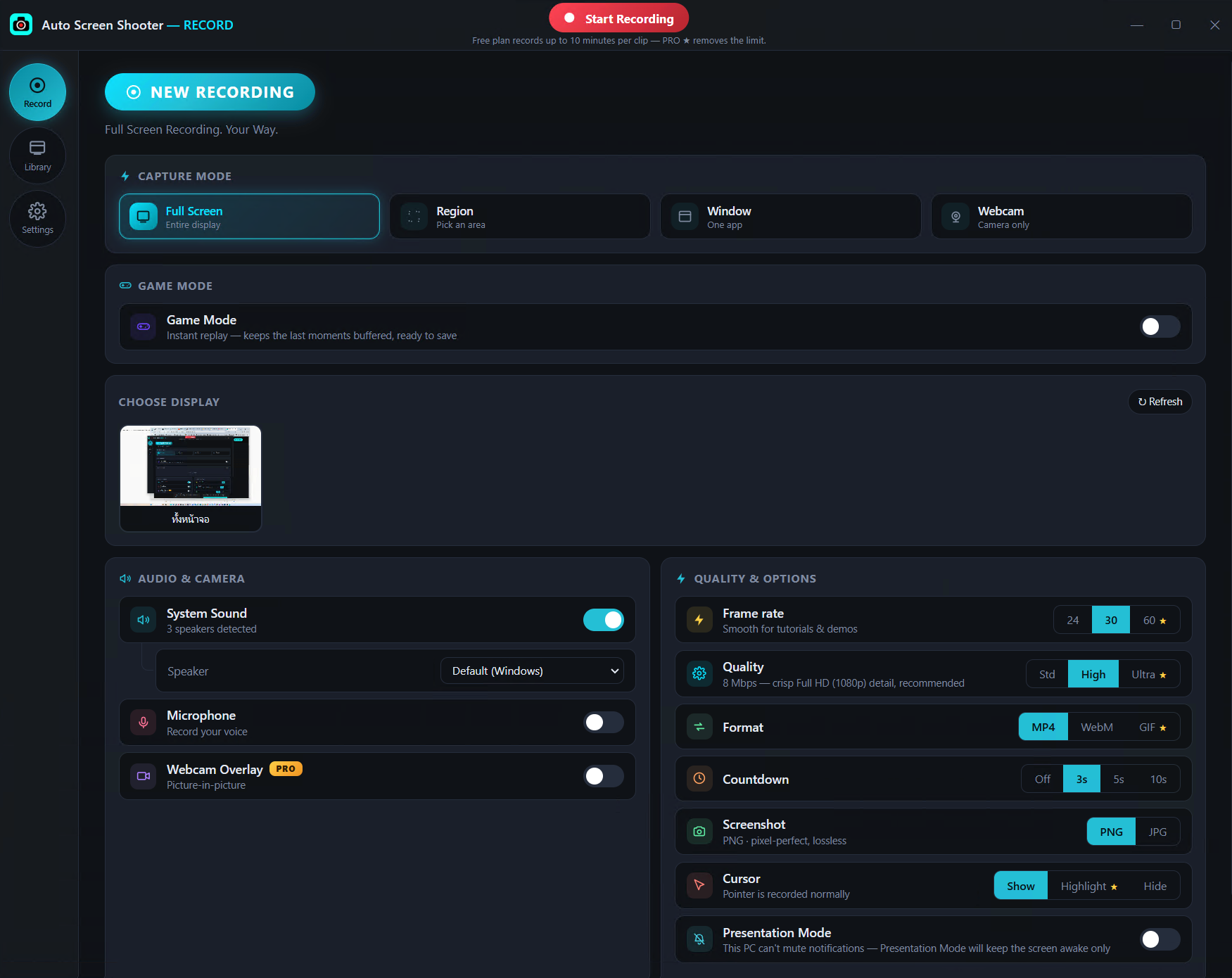
A·S·S RECORD main screen: capture modes (full screen, region, window, webcam), Game Mode, plus audio and quality options
Record — capture modes, Game Mode replay, audio & quality, all on one screen.
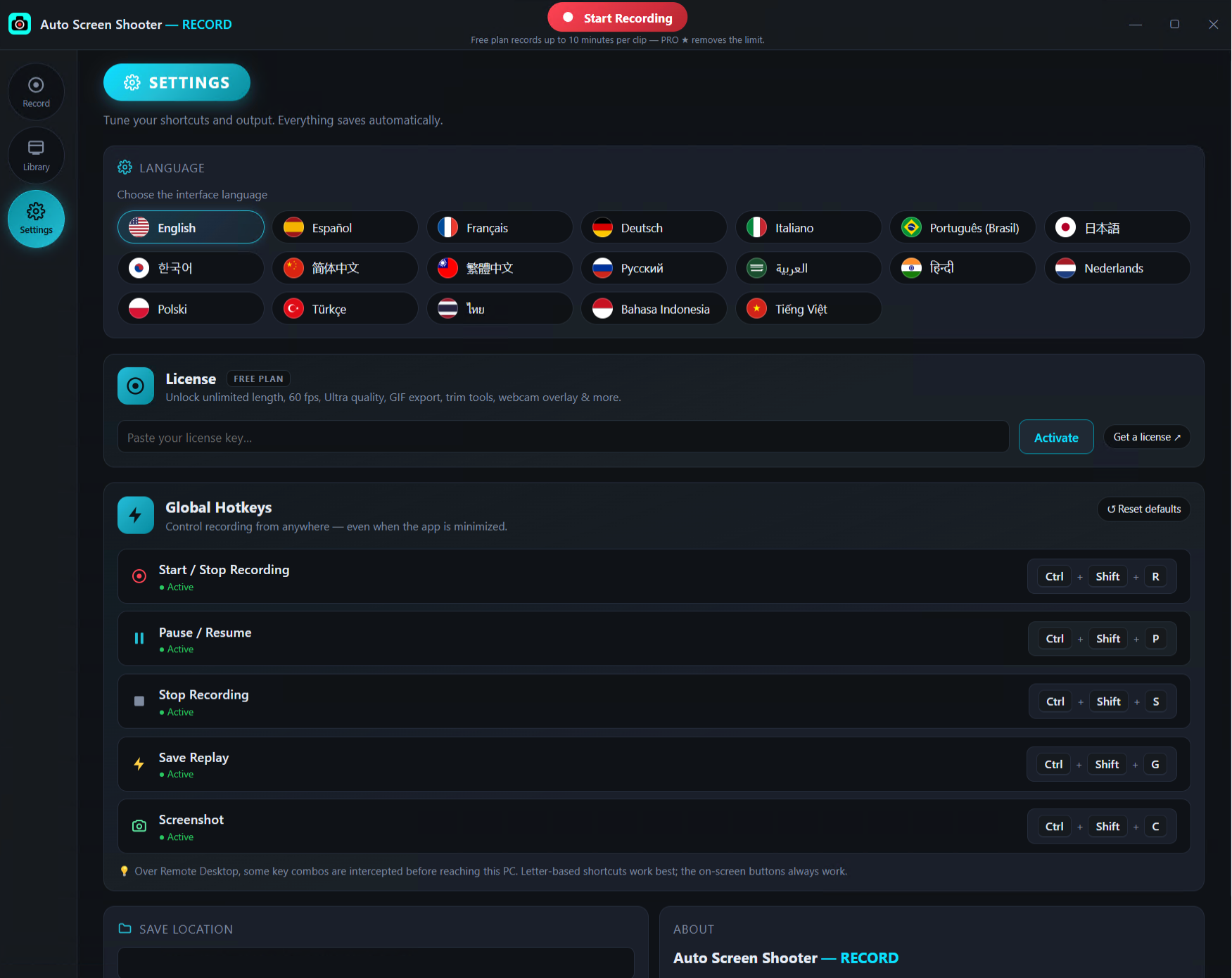
A·S·S RECORD settings: 19-language picker, license activation, and customizable global hotkeys
Settings — 19 languages, license activation, and fully customizable global hotkeys.

Four Ways to Record

Pick a mode and hit record. Mix in webcam overlay, system audio, and microphone however you like.

Full Screen

Record an entire display at native resolution — perfect for tutorials, demos, and walkthroughs.

Region

Drag to select any rectangle and capture just that area, cropped precisely.

Window

Lock onto a single app window so nothing else on your desktop leaks into the recording.

Webcam

Record your camera solo or as a picture-in-picture overlay, with optional mirror.

Records Like a Pro. Costs Nothing.

Audio

System + Mic Mixing

Capture desktop sound and your microphone together, balanced — no extra audio software or virtual cables.

Free

Zero Watermark

Your recordings are clean, always. No logo, no banner, no "made with" stamp — even on the free tier.

Control

Global Hotkeys

Start, pause, stop, screenshot, and save replay without leaving your game or app. Every action also has an on-screen button.

Overlay

Webcam PiP & Cursor Highlight

Add a webcam picture-in-picture and highlight your cursor so viewers follow every move.

Library

Built-in Library

Every recording lands in an organized library where you can trim, convert, and share in a couple of clicks.

Export

MP4 · WebM · GIF

Export H.264 MP4 with faststart for instant web playback, lightweight WebM, or shareable GIF.

Already Recorded.
Just Save It.

Game Mode keeps a rolling instant-replay buffer in the background. Pull off something great? Hit the replay hotkey and the last 30 seconds, 60 seconds, or 2 minutes are saved instantly — no need to have hit record first.

It's the ShadowPlay-style clutch-moment feature, free for everyone. App UI and notifications never appear in your captures, so clips stay clean.

Instant Replay

Default save-replay hotkey

CtrlShiftF8

Buffer length

30s60s2m

Free Core. Optional PRO.

The whole capture engine is free with no watermark. Upgrade to PRO only if you want the high-end creator extras.

Free forever
Free
$0
No account, no watermark, no expiry
  • All capture modes (screen, region, window, webcam)
  • System + microphone audio
  • Global hotkeys & on-screen controls
  • Game Mode instant replay
  • 30 fps · Standard / High quality
  • MP4 & WebM export
  • Up to 10-minute clips
Download Free
Upgrade
RECORD PRO
$29.99
One-time · everything in Free, plus the creator stack. No subscription.
  • Unlimited recording length
  • 60 fps & Ultra 16 Mbps bitrate
  • GIF export
  • Trim & convert in the library
  • Webcam overlay picture-in-picture
  • Cursor highlight
  • Same install — unlock PRO in seconds
Get RECORD PRO via Stripe

Secure Stripe checkout · 30-day money-back guarantee

Recorder Questions

Is it really free with no watermark?
Yes. Every recording is watermark-free, including on the free tier. The free core includes all capture modes, system + mic audio, hotkeys, and Game Mode instant replay, with clips up to 10 minutes. PRO adds unlimited length, 60 fps, Ultra bitrate, GIF export, and trim/convert.
How is it different from OBS Studio?
OBS is powerful but built for streaming and scene compositing, with a steep setup. A·S·S RECORD is a focused recorder: pick a mode, hit record, done — plus instant replay and a built-in trim/convert library. See the full comparison →
Does it have instant replay like ShadowPlay?
Yes — Game Mode keeps a rolling buffer so you can save the last 30s/60s/2m at any moment with a hotkey, on any GPU. Unlike ShadowPlay it isn't limited to NVIDIA hardware, and it's free.
What platforms are supported?
Windows 10 and later today (v1.0.34). A macOS build is planned. Recordings save to your Videos\Auto Screen Shooter - Record folder by default, and the save location is changeable in Settings.

Hit Record. Keep Every Clip.

Download the free, watermark-free recorder for Windows and start capturing in seconds.