
Paste Any URL
Drop in any public web address. The app loads the page in its own engine — no tab juggling, no clutter in the capture.

 Desktop App · Windows & macOS
Point the Windows or Mac app at any URL and shoot the entire page as a JPG, PDF, or MP4 scroll video. Tune scroll cadence, quality, and interval auto-capture. No subscription, ever.
Why the desktop app
The Auto Screen Shooter desktop app scrolls, stitches, and archives entire webpages from a clean URL bar — no browser window to wrangle. Export JPG, PDF, or MP4 with full control over timing and quality.
Download free, keep it as long as you like, and upgrade only when you want watermark-free exports and interval auto-capture. Licenses start at $29.99 for two seats — one charge, forever.
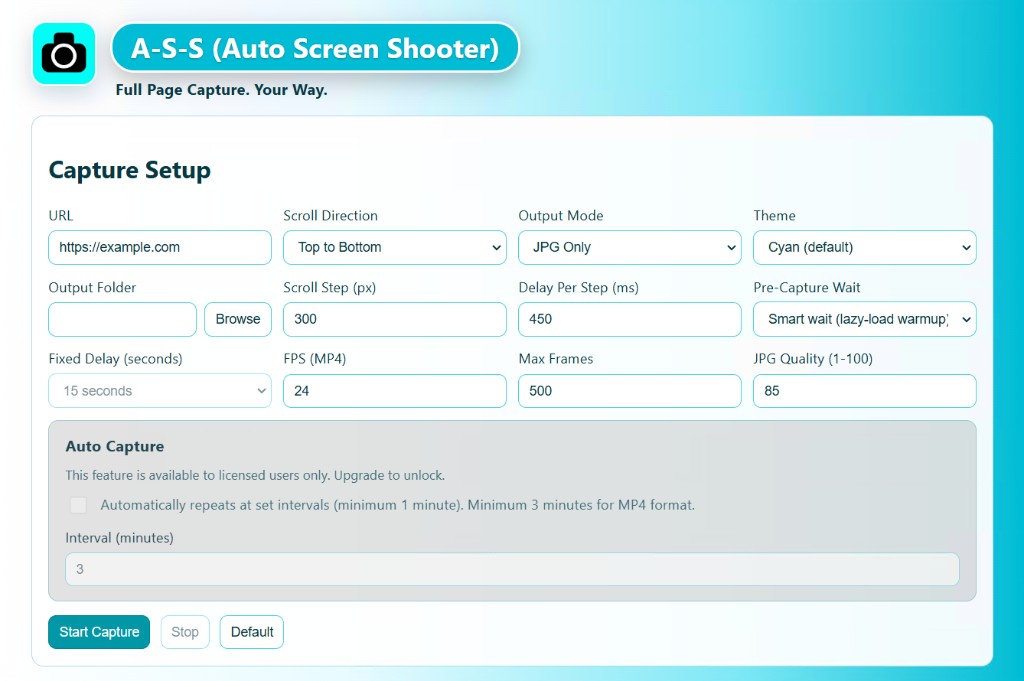
Three simple steps
No browser extension, no learning curve. Paste, choose, shoot.
Drop in any public web address. The app loads the page in its own engine — no tab juggling, no clutter in the capture.
Pick JPG, PDF, or MP4. Set scroll speed and quality. Hit shoot — the app scrolls, stitches, and packages the full page top to bottom.
Clean, full-length output with no clipping and no half-loaded lazy images — ready to share, archive, or present.
What the desktop app does best
Record silky full-page walkthroughs as MP4 — perfect for demos, stakeholder reviews, and social-ready clips without a separate video editor.
Polished, scrollable PDFs that look exactly like the live page — ideal for approvals, legal archives, and client sign-off.
Stitched, full-length JPG with quality you control — no seams, no missing content, no manual Photoshop assembly.
Dial in scroll cadence and smart loading so lazy-loaded sites still finish tall and complete. The control room for power users.
Schedule repeat captures at custom intervals to monitor pages over time — unlocked with a one-time license.
Install on Windows or macOS, run real captures, and upgrade only when you need the licensed export stack.
Native on both
The same capture engine, native on each platform. One license activates two seats — use them however you work.
Full-featured native app for Windows 10+. Capture any public URL and export to JPG, PDF, or MP4 — installs from a simple .msi.
Same powerful engine on macOS, delivered as a .dmg. Capture, scroll, and record right from your Mac without any browser dependency.
Pricing
Use the free build to prove the workflow. Every license is a single charge — no renewals — with free upgrades for life. One license also covers the Chrome extension.
Two concurrent activations across Windows, macOS, and Chrome — assign them however your team works.
Buy 2 Seats via StripeSecure checkout · 30-day money-back guarantee
| 5 seats | $64.95 | Buy → |
| 10 seats | $99.99 | Buy → |
| 100 seats | $799.00 | Buy → |
| 500 seats | $3,495.00 | Buy → |
Not sure yet? Download the free build first → Run real captures, keep it as long as you like.
FAQ
Install on Windows or macOS, shoot JPG, PDF, and MP4, and keep every future release on the house.